
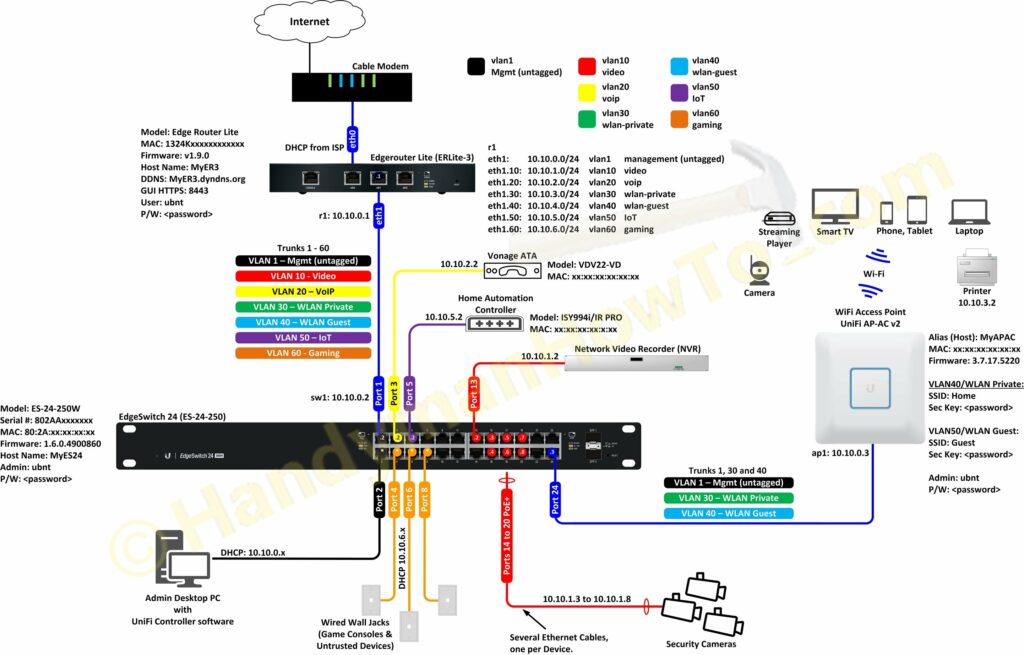
This project explains the factory new Ubiquiti EdgeRouter Lite SOHO network configuration with firewall rules and VLANs. As described in the project introduction, I created my SOHO network design diagram before taking the EdgeRouter Lite (ER3) out of the box:
To view and save the full size network diagram from a desktop browser:
- Click on the above diagram. It will open in a pop-up window.
- Right mouse click on the image.
- Depending on your browser:
- Google Chrome: select “Open image in a new tab”
- Firefox: select “View image”
- Microsoft Edge: select “Save picture as”
Ubiquiti EdgeRouter Lite SOHO Network Configuration
Factory New Startup Config: WAN+2LAN Wizard
The EdgeRouter Lite (ER3) was initially configured using the WAN+2LAN Wizard (see Chapter 12 in the EdgeOS User Guide). My Windows 10 desktop computer is manually configured with a 192.168.1.100 static IP address and connected to port eth0 per the Quick Start Guide. I opened a web browser and entered the ER3 URL https://192.168.1.1/ and logged in with the default ubnt/ubnt user name and password. The WAN+2LAN Wizard is very simple and configures eth1 as the WAN/Internet port. After running the wizard I began my customizing the configuration using the ER3 web GUI but mostly via the Command Line Interface (CLI). I prefer the CLI for configuring firewall rules because I think the GUI firewall editor is confusing.
Per the above diagram my ER3 interfaces (Ethernet ports) are:
- eth0 – Internet WAN to the cable modem. My ISP assigns a DHCP address.
- eth1 – LAN to the EdgeSwitch 24. DHCP range 10.10.0.1/24
- eth2 – Local 2 to the NetGear WiFi router I was using before buying the ER3 with the default DHCP range of 192.168.2.1/24.
The interface Description and IP address scheme are changed by selecting Dashboard → Actions → Config for eth1 and eth0 respectively:
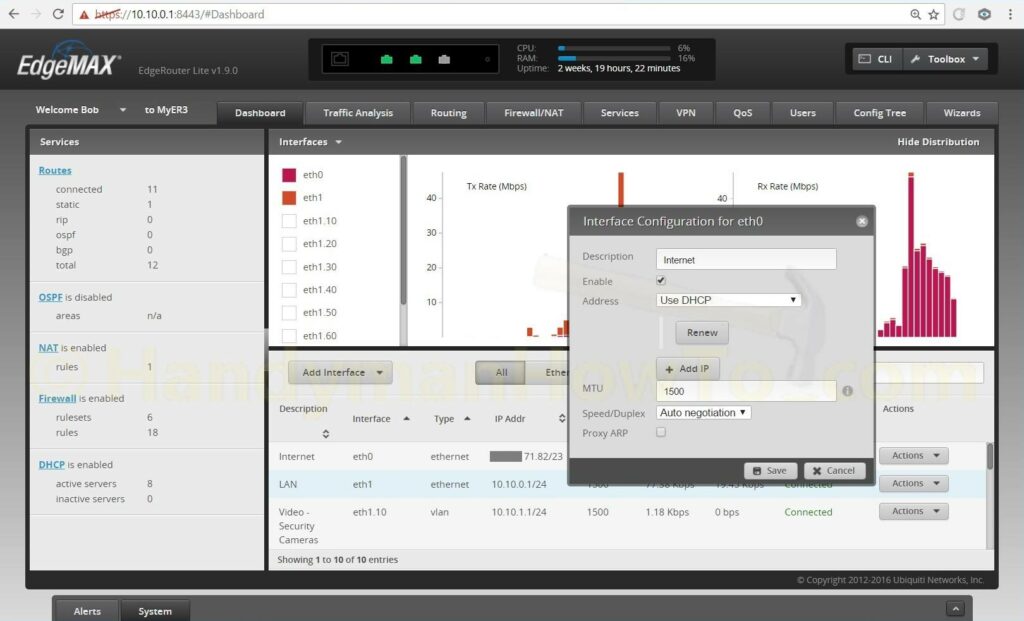
Because I’ve changed the eth1 interface IP address my desktop computer was disconnected when the changes are saved. I changed my Windows 10 PC IP address back to DHCP and connected eth0 to the cable modem. The cable modem has to be rebooted to detect the EdgeRouter MAC address and allocate a new DHCP WAN IP address.
The EdgeRouter port eth1 is connected to the EdgeSwitch port eth0. The desktop PC is connected to the EdgeSwitch port eth2 which gives me access to the EdgeRouter to continue customizing router and switch configuration.
Ubiquiti EdgeSwitch VLAN Configuration
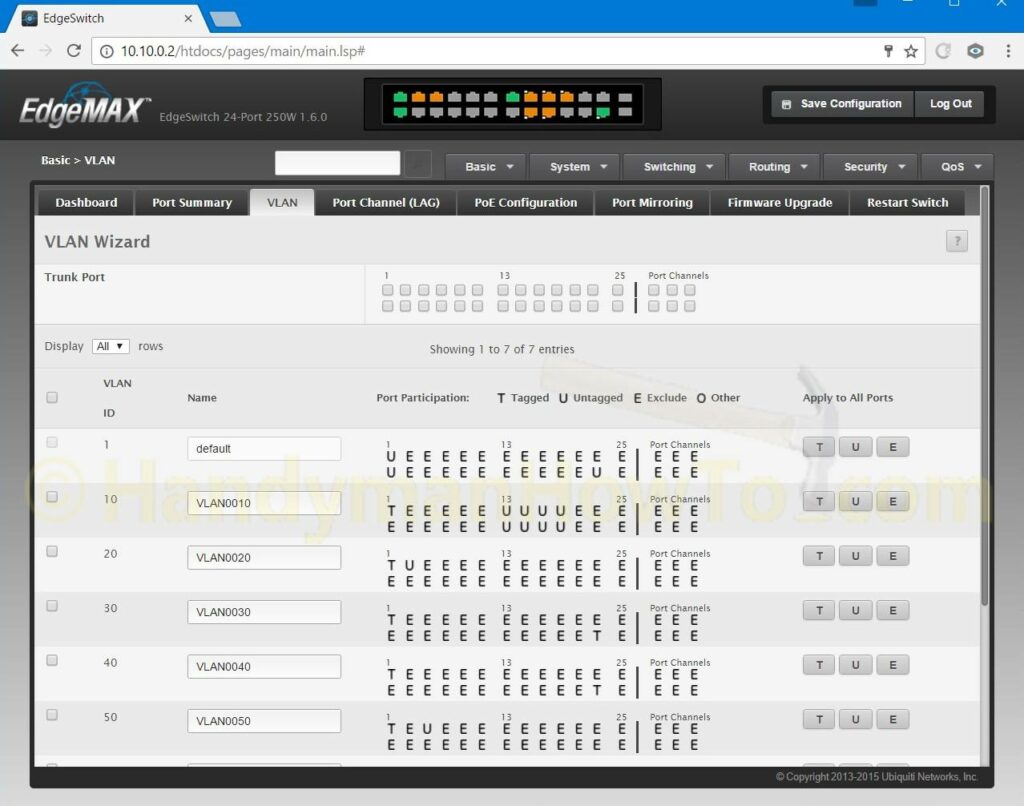
The EdgeSwitch VLAN configuration was straightforward by following the excellent EdgeMAX – VLAN Walkthrough with EdgeSwitch using Sample Enterprise Topology tutorial. Everything was configured using the EdgeSwitch GUI. The network diagram (see above) was indispensable to map everything out and configure the EdgeSwitch. Note: The following screen grab shows the VLAN Wizard which I didn’t use; it shown here because it’s a compact display of the VLAN port settings:
Migrating from a WiFi Router to an EdgeRouter Lite and UniFi Access Point
My old network consisted of a cable modem, Netgear WNDR 4500 WiFi router and a Netgear 24 port switch in a “flat network” configuration… meaning no VLANs. I setup the EdgeRouter, EdgeSwitch and UniFi AP-AC access point in parallel with the old network because it would take time to tune the new network and migrate all the network clients.
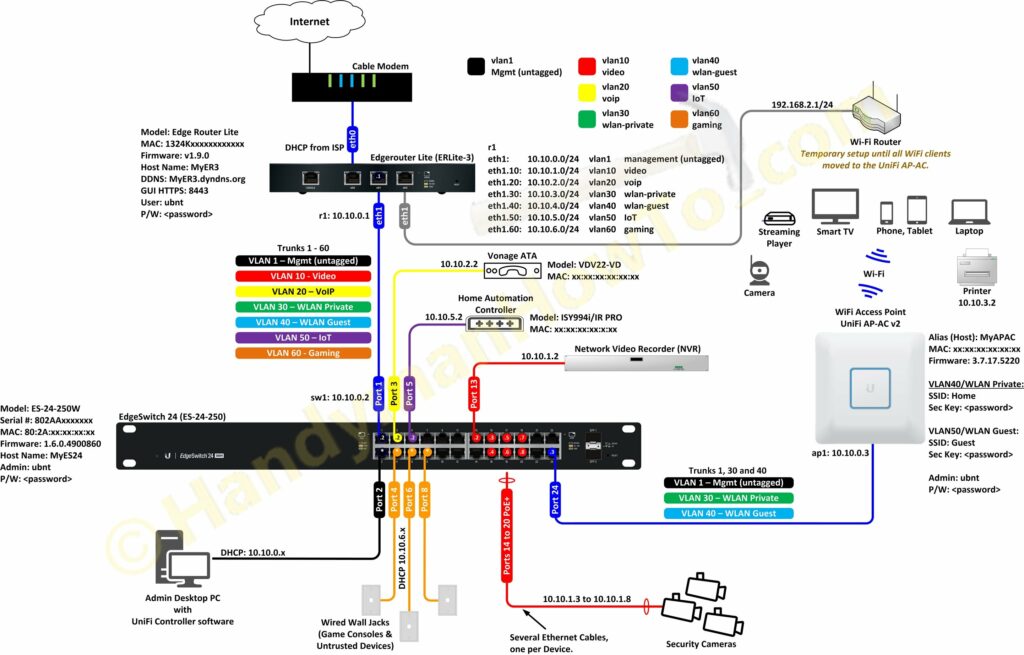
My wife and kids smartphones, tablets, laptops and Roku players only use WiFi and I didn’t want to disrupt their Internet access while configuring the new network. I therefore plugged the Netgear WiFi router WAN/Internet port into the EdgeRouter Lite eth2 LAN port and it just “worked”! (Recall eth2 “Local 2” was configured via the WAN+2LAN Wizard.) I hadn’t configured port forwarding on the Netgear router, which would have been blocked by the EdgeRouter firewall, so remote access wasn’t a concern. The old Netgear WiFi router is shown at the top right of the following diagram:
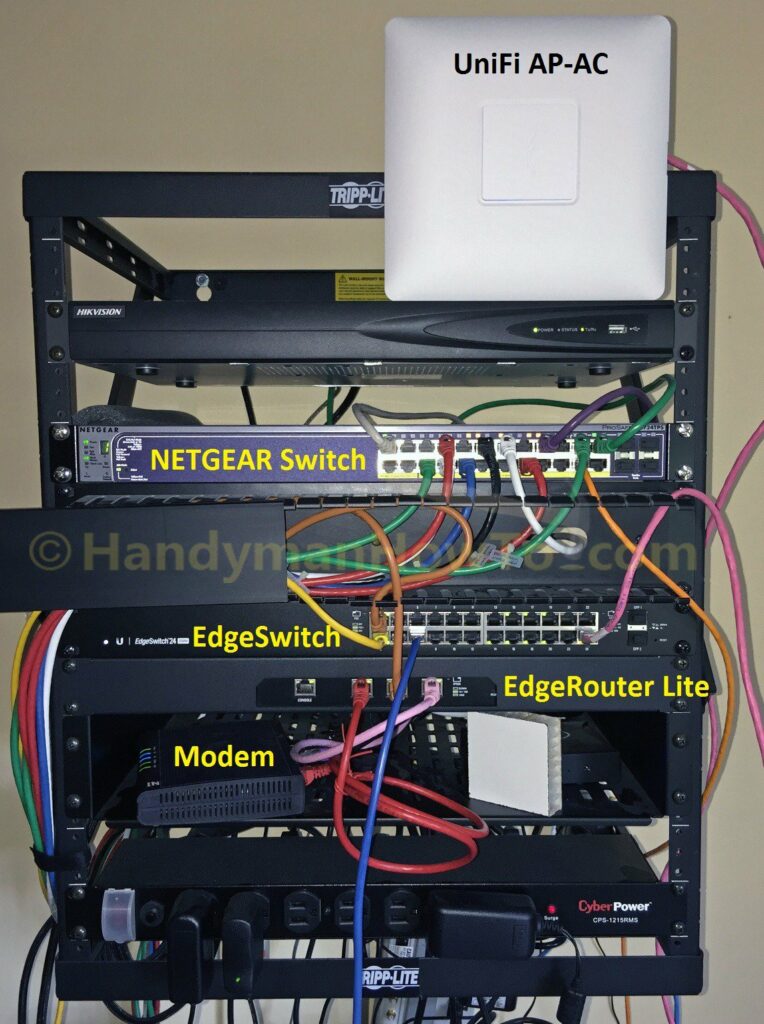
A picture of my messy wall rack with the old and new network gear during the EdgeRouter migration. The Netgear WiFi router is mostly hidden behind the rack on the bottom shelf. I’ve yet to mount the UniFi Access Point to the hallway ceiling:
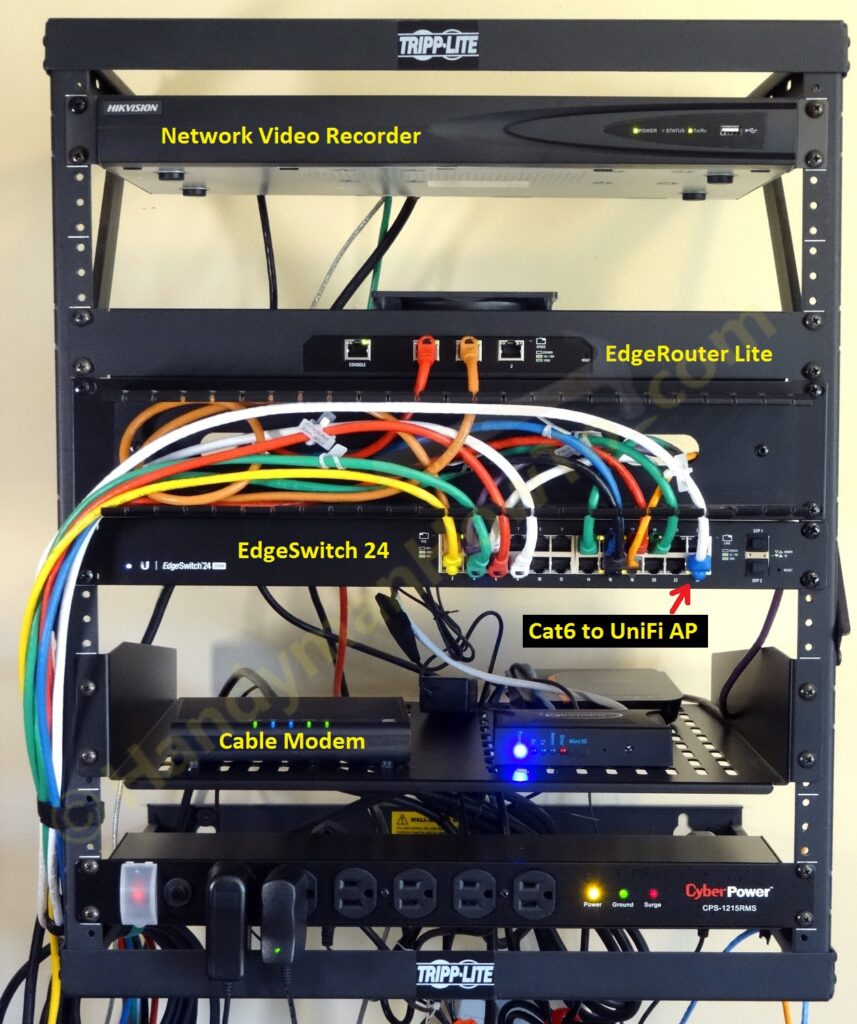
And the wall rack after the network migration is complete:
EdgeRouter Lite Configuration
Some key points about my setup are:
- The EdgeRouter is the DNS, DHCP, NTP and OpenVPN server.
- VLANs are configured to partition the network by functional area: Video (security cameras), VoIP, IoT, Home and Guest Wifi, etc.
- VLANs also make it easier to configure highly specific firewall rules.
- All unsolicited (state = new) traffic connections from the Internet are dropped by default.
- Only OpenVPN connections are allowed from the Internet.
- Guest WiFi is isolated from the LAN and can only reach the Internet.
- Security cameras on the Video VLAN are isolated and cannot make new connections to the Internet nor probe the other VLANs.
This prevents a rogue or malware infected camera from autonomously sending traffic the Internet, possibly leaking private information or participating in a DDoS attack. - Firewall rules block BOGONS and various scanners including Shodan.io and ShadowServer.org.
Blocking scanners is a whack-a-mole job and I update the block lists by monitoring the log (/var/log/messages). - UPnP is not enabled due to security vulnerabilities.
My sanitized EdgeRouter Lite configuration (passwords and sensitive data replaced with generic values) as output by ubnt@ubnt:~$ show configuration command is:
firewall {
all-ping enable
broadcast-ping disable
group {
address-group Shodan {
description "Shodan and other scanners"
address 208.180.20.97
address 198.20.69.74
address 198.20.69.98
address 198.20.70.114
address 198.20.99.130
address 93.120.27.62
address 66.240.236.119
address 71.6.135.131
address 66.240.192.138
address 71.6.167.142
address 82.221.105.6
address 82.221.105.7
address 71.6.165.200
address 188.138.9.50
address 85.25.103.50
address 85.25.43.94
address 71.6.146.185
address 71.6.158.166
address 198.20.87.98
address 66.240.219.146
address 209.126.110.38
address 104.236.198.48
address 184.105.247.196
address 141.212.122.112
address 125.237.220.106
address 192.81.128.37
address 74.82.47.2
address 216.218.206.66
address 37.187.114.171
address 184.105.139.67
address 54.81.158.232
address 141.212.122.144
address 141.212.122.128
address 54.206.70.29
}
network-group BOGONS {
description BOGONS
network 10.0.0.0/8
network 100.64.0.0/10
network 127.0.0.0/8
network 169.254.0.0/16
network 172.16.0.0/12
network 192.0.0.0/24
network 192.0.2.0/24
network 192.168.0.0/16
network 198.18.0.0/15
network 198.51.100.0/24
network 203.0.113.0/24
network 224.0.0.0/3
}
network-group Blocklist {
description "Block scanners by CIDR"
network 74.82.47.0/24
network 184.105.139.0/24
network 184.105.247.0/24
network 216.218.206.0/24
network 185.35.62.0/24
network 185.35.63.0/24
}
network-group LAN_NETWORKS {
description "RFC1918 LAN Networks"
network 192.168.0.0/16
network 172.16.0.0/12
network 10.0.0.0/8
}
network-group VIDEO_VLAN {
description "Video Camera VLAN subnet"
network 10.10.1.0/24
}
network-group VIDEO_VLAN_BLOCK_NETS {
description "Drop Video Camera traffic to other VLANs"
network 10.10.2.0/24
network 10.10.4.0/24
network 10.10.5.0/24
network 10.10.6.0/24
}
}
ipv6-receive-redirects disable
ipv6-src-route disable
ip-src-route disable
log-martians enable
name GUEST_PROTECT_IN {
default-action accept
rule 10 {
action accept
description "Accept Established/Related"
protocol all
state {
established enable
related enable
}
}
rule 20 {
action drop
description "Drop LAN_NETWORKS"
destination {
group {
network-group LAN_NETWORKS
}
}
protocol all
}
}
name GUEST_PROTECT_LOCAL {
default-action drop
rule 10 {
action accept
description "Accept DNS"
destination {
port 53
}
protocol udp
}
rule 20 {
action accept
description "Accept DHCP"
destination {
port 67
}
protocol udp
}
}
name VIDEO_VLAN_IN {
default-action accept
rule 20 {
action drop
destination {
group {
network-group VIDEO_VLAN_BLOCK_NETS
}
}
}
}
name WAN_IN {
default-action drop
description "WAN to internal"
rule 10 {
action accept
description "Allow established/related"
state {
established enable
related enable
}
}
rule 20 {
action drop
description "Drop invalid state"
state {
invalid enable
}
}
rule 30 {
action drop
description "Drop BOGONS"
log enable
protocol all
source {
group {
network-group BOGONS
}
}
}
rule 40 {
action drop
description "Blocklisted CIDRs"
log enable
protocol all
source {
group {
network-group Blocklist
}
}
}
rule 50 {
action drop
description "Drop Shodan scanners"
log enable
protocol all
source {
group {
address-group Shodan
}
}
}
}
name WAN_LOCAL {
default-action drop
description "WAN to router"
rule 10 {
action accept
description "Allow established/related"
state {
established enable
related enable
}
}
rule 20 {
action drop
description "Drop invalid state"
state {
invalid enable
}
}
rule 30 {
action drop
description "Drop Shodan scanners"
log enable
protocol all
source {
group {
address-group Shodan
}
}
}
rule 40 {
action drop
description "Drop BOGONS"
log enable
protocol all
source {
group {
network-group BOGONS
}
}
}
rule 50 {
action drop
description "Blocklisted CIDRs"
log enable
protocol all
source {
group {
network-group Blocklist
}
}
}
rule 60 {
action accept
description OpenVPN
destination {
port 443
}
log disable
protocol tcp
}
}
name WAN_OUT {
default-action accept
description "Internal to WAN"
rule 10 {
action accept
description "Accept Established/Related security camera to WAN"
log disable
protocol all
source {
group {
network-group VIDEO_VLAN
}
}
state {
established enable
related enable
}
}
rule 20 {
action drop
description "Block security camera initiated connections to WAN"
log enable
protocol all
source {
group {
network-group VIDEO_VLAN
}
}
state {
new enable
}
}
}
receive-redirects disable
send-redirects enable
source-validation disable
syn-cookies enable
}
interfaces {
ethernet eth0 {
address dhcp
description Internet
dhcp-options {
default-route update
default-route-distance 210
name-server no-update
}
duplex auto
firewall {
in {
name WAN_IN
}
local {
name WAN_LOCAL
}
out {
name WAN_OUT
}
}
speed auto
}
ethernet eth1 {
address 10.10.0.1/24
description LAN
dhcp-options {
default-route update
default-route-distance 210
name-server update
}
duplex auto
speed auto
vif 10 {
address 10.10.1.1/24
description "Video - Security Cameras"
firewall {
in {
name VIDEO_VLAN_IN
}
}
mtu 1500
}
vif 20 {
address 10.10.2.1/24
description "VoIP - Vonage ATA"
mtu 1500
}
vif 30 {
address 10.10.3.1/24
description "WLAN Private"
mtu 1500
}
vif 40 {
address 10.10.4.1/24
description "WLAN Guest"
firewall {
in {
name GUEST_PROTECT_IN
}
local {
name GUEST_PROTECT_LOCAL
}
}
mtu 1500
}
vif 50 {
address 10.10.5.1/24
description "IoT - Home Automation Controller"
mtu 1500
}
vif 60 {
address 10.10.6.1/24
description "Gaming & General Use"
}
}
ethernet eth2 {
address 192.168.2.1/24
description "Local 2"
duplex auto
speed auto
}
loopback lo {
}
openvpn vtun0 {
description "OpenVPN server"
hash sha256
local-port 443
mode server
openvpn-option --comp-lzo
openvpn-option "--tls-auth /config/auth/ta.key 0"
openvpn-option "--verb 5"
openvpn-option --tls-server
openvpn-option "--cipher AES-256-CBC"
openvpn-option "--tls-cipher DHE-RSA-AES256-SHA"
openvpn-option --float
protocol tcp-passive
server {
name-server 10.10.0.1
push-route 10.10.0.0/24
push-route 10.10.1.0/24
push-route 10.10.5.0/24
subnet 10.99.99.0/24
}
tls {
ca-cert-file /config/auth/ca.crt
cert-file /config/auth/server.pem
dh-file /config/auth/dh2048.pem
key-file /config/auth/server.key
}
}
}
service {
dhcp-server {
disabled false
hostfile-update disable
shared-network-name LAN1 {
authoritative enable
subnet 10.10.0.0/24 {
default-router 10.10.0.1
dns-server 10.10.0.1
lease 86400
start 10.10.0.38 {
stop 10.10.0.243
}
static-mapping MyAPAC_UniFi_AP-AC {
ip-address 10.10.0.3
mac-address xx:xx:xx:xx:xx:xx
}
}
}
shared-network-name LAN2 {
authoritative enable
subnet 192.168.2.0/24 {
default-router 192.168.2.1
dns-server 192.168.2.1
lease 86400
start 192.168.2.38 {
stop 192.168.2.243
}
}
}
shared-network-name VLAN10_Video {
authoritative disable
subnet 10.10.1.0/24 {
default-router 10.10.1.1
dns-server 10.10.1.1
lease 86400
start 10.10.1.50 {
stop 10.10.1.60
}
}
}
shared-network-name VLAN20_VoIP {
authoritative disable
subnet 10.10.2.0/24 {
default-router 10.10.2.1
dns-server 10.10.2.1
lease 86400
start 10.10.2.50 {
stop 10.10.2.100
}
static-mapping Vonage_ATA {
ip-address 10.10.2.2
mac-address xx:xx:xx:xx:xx:xx
}
}
}
shared-network-name VLAN30_WLAN_Private {
authoritative disable
subnet 10.10.3.0/24 {
default-router 10.10.3.1
dns-server 10.10.3.1
lease 86400
start 10.10.3.50 {
stop 10.10.3.100
}
static-mapping EPSON_PRINTER_HOST_NAME {
ip-address 10.10.3.2
mac-address xx:xx:xx:xx:xx:xx
}
}
}
shared-network-name VLAN40_WLAN_Guest {
authoritative disable
subnet 10.10.4.0/24 {
default-router 10.10.4.1
dns-server 10.10.4.1
lease 86400
start 10.10.4.50 {
stop 10.10.4.75
}
}
}
shared-network-name VLAN50_IoT {
authoritative disable
subnet 10.10.5.0/24 {
default-router 10.10.5.1
dns-server 10.10.5.1
lease 86400
start 10.10.5.1 {
stop 10.10.5.10
}
}
}
shared-network-name VLAN60_Gaming {
authoritative disable
subnet 10.10.6.0/24 {
default-router 10.10.6.1
dns-server 10.10.6.1
lease 86400
start 10.10.6.50 {
stop 10.10.6.100
}
}
}
use-dnsmasq disable
}
dns {
dynamic {
interface eth0 {
service dyndns {
host-name MyER3.dyndns.org
login MyLoginName
password *********
}
}
}
forwarding {
cache-size 150
listen-on eth1
listen-on eth2
listen-on eth1.10
listen-on eth1.20
listen-on eth1.30
listen-on eth1.40
listen-on eth1.50
listen-on eth1.60
listen-on vtun0
}
}
gui {
http-port 80
https-port 8443
older-ciphers disable
}
nat {
rule 5010 {
description "masquerade for WAN"
outbound-interface eth0
type masquerade
}
}
ssh {
port 22
protocol-version v2
}
}
system {
host-name MyER3
login {
user ubnt {
authentication {
encrypted-password ****************
plaintext-password
}
full-name Bob
level admin
}
}
name-server 8.8.8.8
name-server 8.8.4.4
name-server 208.67.222.222
name-server 208.67.220.220
ntp {
server 0.ubnt.pool.ntp.org {
}
server 1.ubnt.pool.ntp.org {
}
server 2.ubnt.pool.ntp.org {
}
server 3.ubnt.pool.ntp.org {
}
}
offload {
hwnat disable
ipv4 {
forwarding enable
vlan enable
}
}
syslog {
global {
facility all {
level notice
}
facility protocols {
level debug
}
}
}
time-zone America/New_York
traffic-analysis {
dpi enable
export enable
}
}
The above “pretty print” configuration is for human eyes only and cannot be loaded or executed by the EdgeRouter. The executable EdgeRouter commands are displayed by ubnt@ubnt:~$ show configuration commands which outputs a long list of set statements:
set firewall all-ping enable
set firewall broadcast-ping disable
set firewall group address-group Shodan description 'Shodan and other scanners'
set firewall group address-group Shodan address 208.180.20.97
set firewall group address-group Shodan address 198.20.69.74
...etc
This project is continued EdgeRouter Lite SOHO Network Firewall Rules.
Thanks,
Bob
